Overview
Transfer: A transfer is a request from a provider to have another provider to cover their shifts: e.g. Please work 4 shifts for me.
Swap: A swap is a request from a provider who wants to trade shifts: e.g. If you can work 4 shifts for me, I can work 4 shifts for you.
Enabling Transfers and Swaps
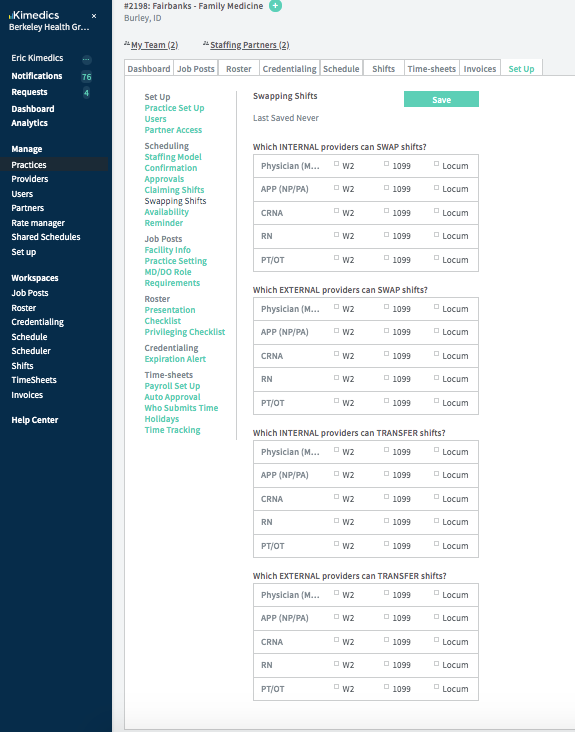
You can determine whether providers can initiate transfers and swaps.
You can enable transfers and swaps for:
- internal providers: providers managed by your organization,
- external providers: providers managed by another organization,
- and further by worker classification (W2, 1099, locum)
Find this form in your practice Set up/ Scheduling / Swapping shifts (see below)
Where are requests for transfers and swaps?
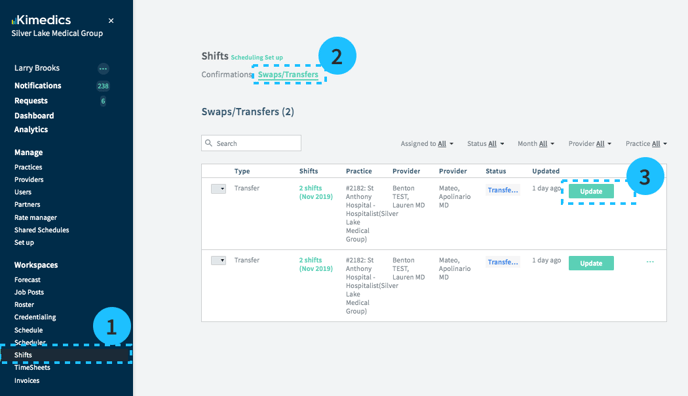
Transfer and swap requests are in a table in the Shifts section, in the Swaps/Transfers tab.
How are transfers and swaps created?
Providers create requests to transfer or swap shifts using the Kimedics mobile app. If providers you manage do not use Kimedics, you cannot use transfers and swaps. Instead, cancel their shifts and assign them to other providers using the schedule.
Approving or declining transfer/swap requests
Note: To move a pending transfer or swap request from a pending state into a confirmed or declined state, either
- the provider receiving the request can update it in provider mobile app by accepting the proposed transfer/swap, or
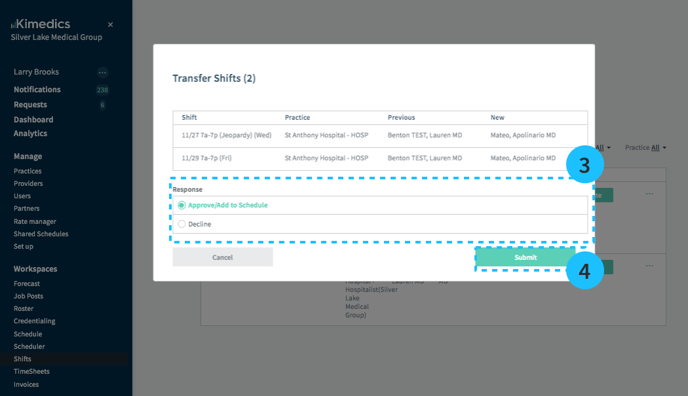
- the manager can approve it following these steps (see images below):
- Select Shifts on left sidebar
- Select Swaps/Transfers tab and press Update on the swap or transfer you want to review.
- Here you will see the details of the transfer, and you can select Approve/Add to Schedule or Decline.
Approved transfers and swaps are updated on the schedule to reflect the new provider. Declined items will not change the schedule.