Track time as you work
You can use Kimedics to track time as you work.
Record the following activities (managers can enable some or all):
- Base (non-overtime) hours
- Overtime hours
- Call
- Call-In
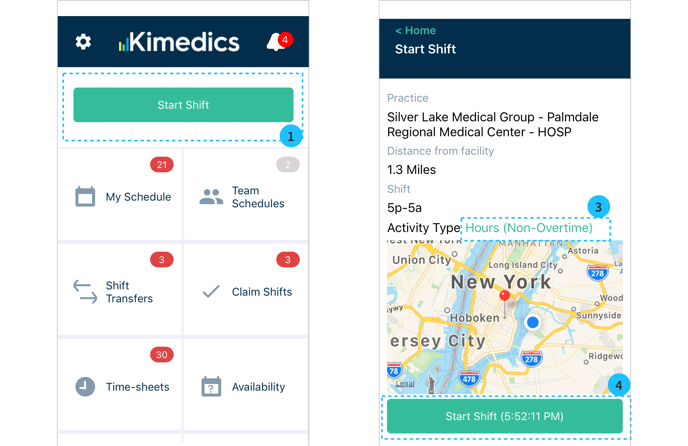
How to record time (see above screenshots)
- On the day of your shift, select Start Shift from the home screen and select the relevant shift.
- Select the shift you are working.
- You can change the type of activity you are recording:
- Base (non-overtime)
- Overtime hours
- Call
- Call-In
- Select Start Shift to start recording your hours
- Select Stop from the home screen to stop the clock. This time will be recorded and listed on your time sheet for this shift.
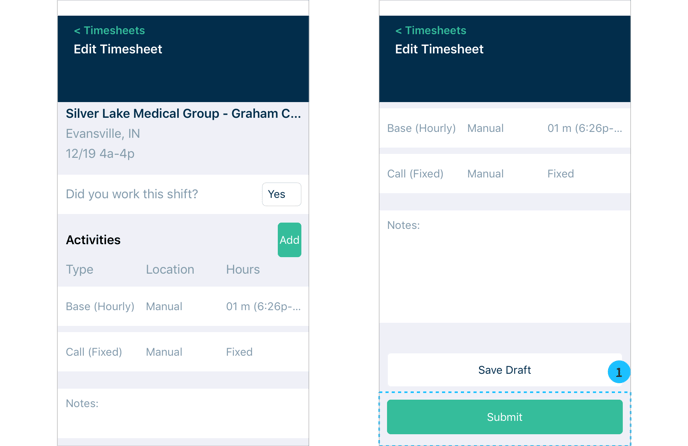
- After you Stop your shift, you can edit your time sheet and submit when it is complete (see 1 below)