
Time Sheets Overview
Confirmations are agreements between providers and organizations about what should happen on the day of a shift.
Time sheets explain what really happens on the day of the shift (exact hours worked, overtime, call, call-in, etc.). They are used to generate invoices.
Who Submits Time Sheets?
Only providers who are using Kimedics mobile can submit time sheets on their own behalf. They can submit time sheets on the day of their shift, or after that date has passed.
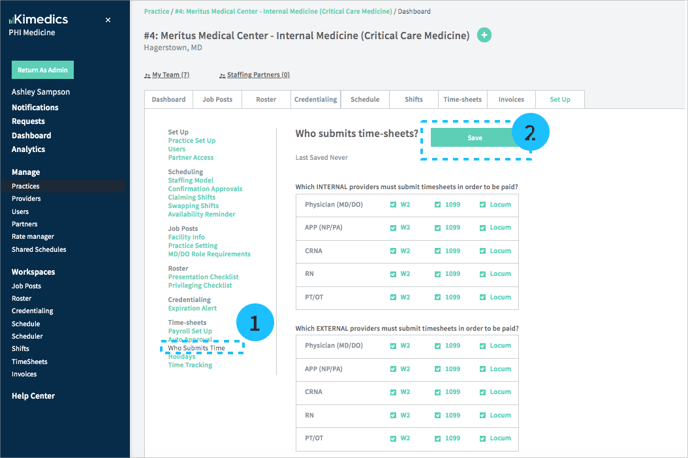
You can customize which providers in your organization need to submit time sheets after a shift by:
- Worker classification: W2, 1099, locum
- Provider type: Physician (MD/DO), APP (NP/PA), CRNA, RN, PT/OT
- Internal/External: Whether your organization manages the provider
Update your preferences in the practice Set Up tab in the Who Submits Time section (see below).
Providers that do not require time submission will move the time sheet status directly to "approved" state.
Time sheet statuses
There is a time sheet for each shift that has passed, and each time sheet is associated with one of the following statuses:
- Pending Submission - the provider has not submitted it (time sheet can be edited in this status)
- Pending Approval - the organization has not reviewed it (time sheet can be edited in this status)
- Disputed - the organization rejects some part of the time sheet (time sheet can be edited in this status)
- Approved - the time sheet is approved by both parties
- Approved/Locked - the time sheet has an invoice or pay statement connected to it
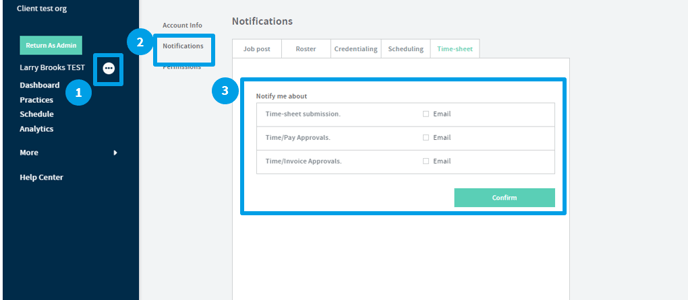
Time Sheet Notification Set Up
To ensure you are getting the correct notifications.
Time Sheets For Invoices vs. Pay
We offer two different workspaces/workflows to track time submission and approval:
1. Time and Pay:
- sent to: providers
- rates: connects confirmed shifts/other approvals and comp rates
- pay period is based on the pay cadence for paying providers
2. Time and Invoices:
- sent between organizations
- rates: connects confirmed shifts/other approvals and billable rates
- pay period is based on the invoicing cadence between organizations for invoicing
Please note the the time sheet source data is share between the two processes so there is one time sheet source of truth. Organizations can use other approvals/bonuses to adjust for deviations outside of time sheet activity units (i.e. hours).