
Overview
Each provider has one unique base application. The base application is a form containing all the common information across job applications for providers:
- General
- Citizenship
- Identification Numbers
- Licenses
- Specialty
- Experience
- References
- Skills and Procedures
Who can edit the base application?
You can edit the base application of providers managed by your organization and the provider has accepted your invite to connect (if they are listed as "invited" or "requested" on the provider table they have not accepted your request to connect yet).
When to edit the base application?
The base application is requested at the CV/Presentation Pending roster status.
Editing a provider's base application
Note: The general section contains important information like the specialty and credentials.
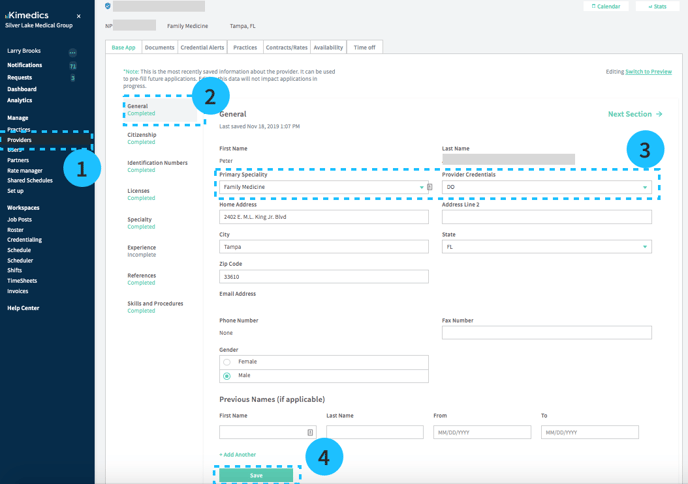
- Providers section and click on the provider you want
- Base app
- Select a section (e.g. General) of the application and update the information
- Select Save
Viewing the base app from the roster
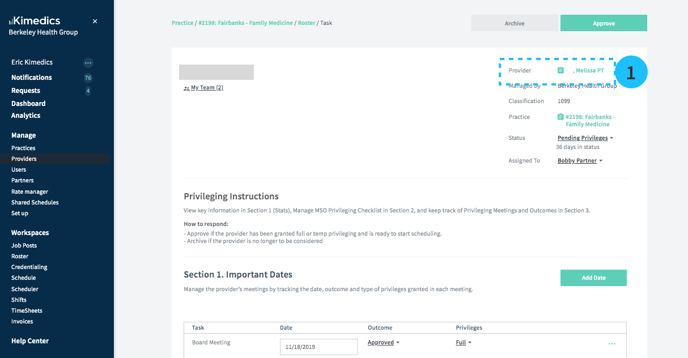
You can also view the base app from a roster task. Click the provider's name (see 1 above) to see the provider profile.