Presentations overview
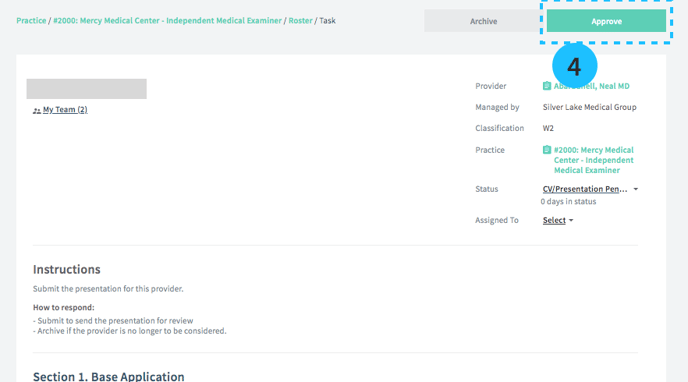
Presentations are the information that must be submitted on behalf of a candidate to be considered for a job at a practice. The presentation is set up in the Roster status "CV/Presentation" pending.
Who submits a presentation?
The organization that manages the provider submits the presentation. For example, if your staffing agency submits a provider to your practice they are responsible for completing the presentation when the status is "CV/Presentation Pending."
Who approves a presentation?
The organization that manages the practice approves the presentation (aka the "Client" Organization).
Completing the presentation
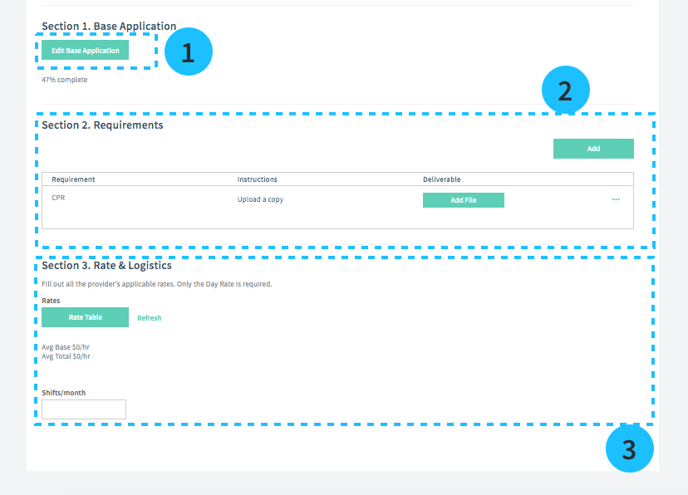
1. The base application
First, review the provider's base application. Each provider has 1 base application containing the critical information about their background and experience. You can reference it every time they apply to a job. If the base application is up-to-date, there's nothing to do for this step.
2. Requirements
Complete any requirements in the list. These are practice-specific requirements, like uploading a copy of a Background Check or CPR Certification.
You can also add a custom requirement for this application by selecting Add.
3. Rates & Logistics
Submit requirements for provider rates and travel logistics.
4. Approve when you are ready to submit the presentation (see below)