Defining contracts
Kimedics lets you upload Contracts between providers, organizations, and practices.
Contracts contain
- Rate tables: A providers rates for different shift types and scenarios (e.g. Holiday rate, Overtime rate, etc.)
- Travel logistics: ex. Traveling from Portland, ME
- Other terms: ex. Days to Cancel, Placement Fee
Where are contracts?
From provider profile
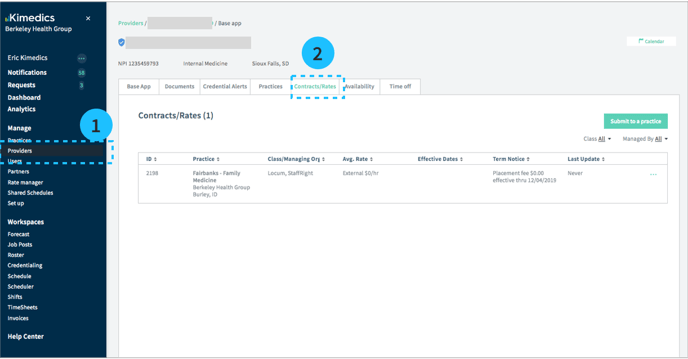
- Go to Providers section on the sidebar and select a provider
- Select Contracts/Rates tab and select a contract for a specific practice
From the schedule
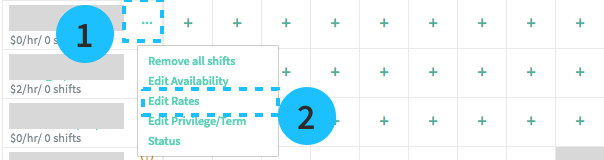
View contracts from the schedule, by clicking the ... next to a provider's name and Edit Rates.
When are contracts created?
Blank contracts are created automatically when a provider is added to a practice roster.
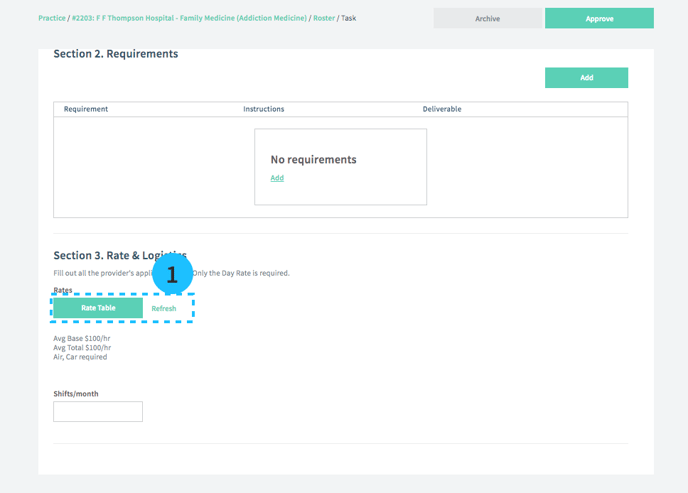
Managers are prompted to update contract information during the CV/Presentation Pending status (see #1 below).
Parts of a contract
Inputs for travel
- Does the provider require airfare, rental car, or a hotel?
- Where will the provider be traveling from?
Travel information is collected to estimate costs on the Stats page.
- If air travel is required, it will add $100 per shift to estimated costs
- If a car is required, it will add $100 per shift to estimated costs
- If a hotel is required, it will add $200 per shift to estimated costs
Rate tables
A rate table
- Start and end date: A provider can have many rate tables for a practice, as long as they cover different date ranges. For instance, one rate table might apply in the provider's first year, while another has increased rates for year two.
- Autofill rates: These (optional) rates will apply to shifts that have empty rates
- Individual shift rates: These shifts are defined by the practice, and the provider can fill in specific rates for different shift types, or autofill to apply to all shift types. You will only see shifts that match the provider's credential (e.g. MD/DO a provider with credential MD).
Editing a rate table
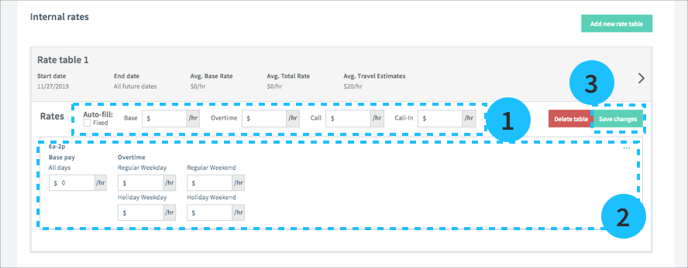
- You will see a row called Auto-fill: If you enter values here, they will automatically apply to all your shifts below (in this example, there is 1 shift type: 6a-2p)
- You can edit the specific rates for each specific shift type. If you don't see the appropriate rate inputs, you should edit the pay structure by clicking the ... button on the right (Learn more about pay structures).
- Save changes to update your rate table
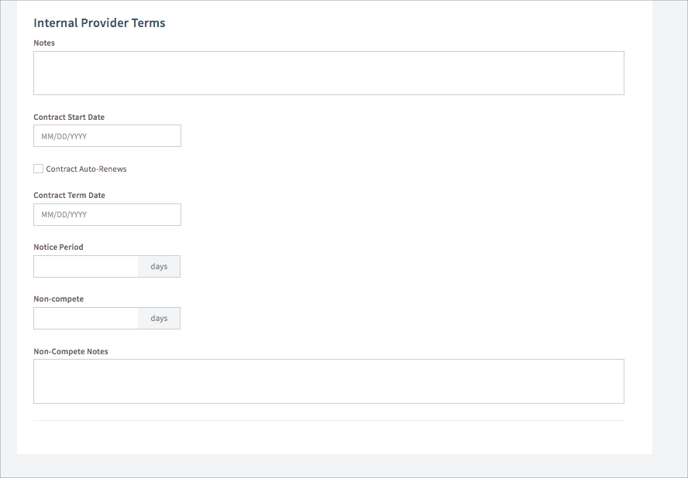
Provider Terms
This section (below) contains other contract terms for this provider.