
Some of you are super users and some just need to review your tasks. For users who need a more simplified navigation you can adjust this in your "User account".
To set this up follow these steps:
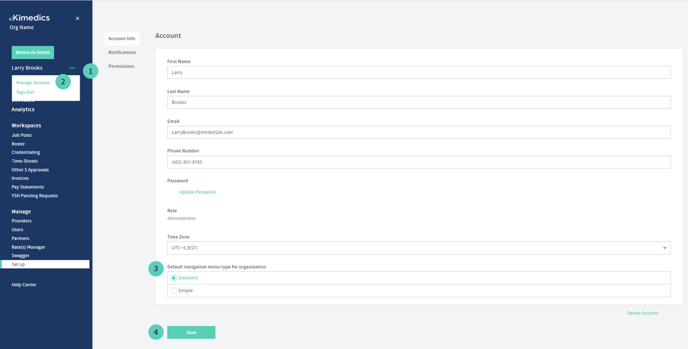
1. click on the "..." next to your name in the left navigation
2. click on "Manage Account"
3. on the "Account Info" page, you will see "Default navigation menu type for organization". You can select "Standard" to always show left navigation elements, or "Simple" for a simplified navigation experience.
4. Once you click save, refresh your browser and your selection will now be shown in the navigation!
For Admins:
You can set up all users in a particular role to have a "simple" or "standard" navigation rule by default. See Define user permissions with roles article on adding new roles where you can customize this.