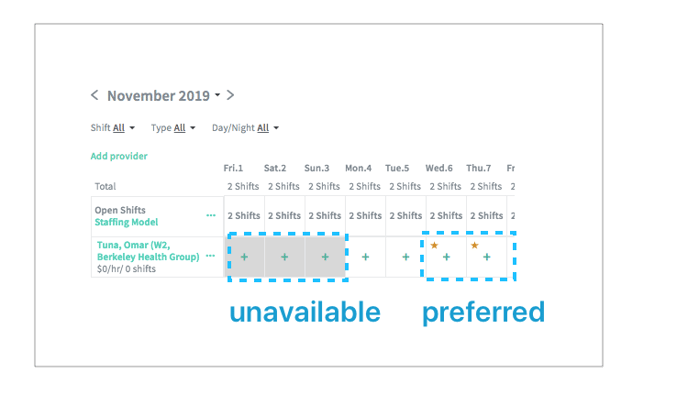
What does the calendar show?
The provider's calendar shows shifts they have scheduled as well as their scheduling preferences. Providers can edit their availability directly in the mobile app, or you can edit it on the web.
Days can be set to:
- Available: the provider can work this day
- Unavailable: the provider cannot work this day
- Preferred: the provider would like to work this day.
This calendar also shows:
- Scheduled shifts: How to add shifts
- Time off: Adding time off
Updating availability
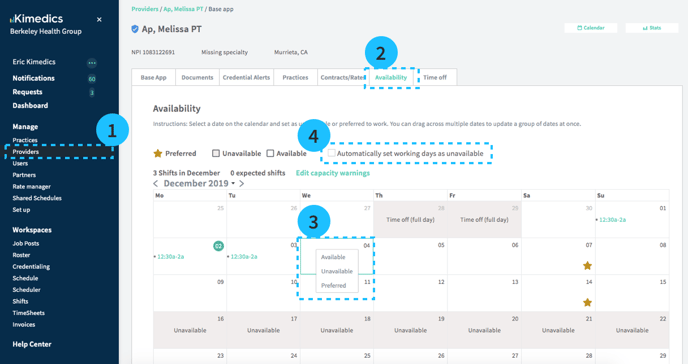
- Providers section on left sidebar
- Select Availability tab
- Select a day or click and drag to select multiple days and select status: Available, Unavailable or Preferred
- Select Automatically set working days as unavailable if you want days with scheduled shifts to be displayed as unavailable by default.
Availability reminders
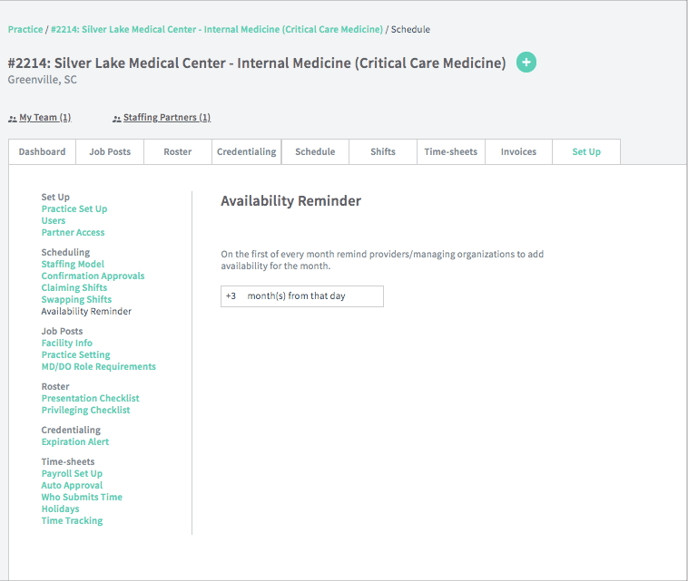
By default, providers are asked to provide availability 3 months in advance. You can view this setting at your practice Set up/Availability Reminder. You cannot edit this.
Availability and scheduling
(Below) Provider availability is also shown in the scheduling page to help make scheduling decision.