
What are transfers and swaps?
If you have a scheduled shift that you can no longer work, you can request a
- a transfer - if you want another provider to cover your shift
- a swap - if you want to trade shifts with another provider (i.e. they work shifts for you, and you work shifts for them)
How to request a transfer
- From the home screen, select My Schedule
- Select the shifts you want to transfer by tapping them. You can select multiple shifts.
- Initiate Transfer
- tap the Transfer To field to select the provider you want to transfer your shift(s) to.
- Submit
How to request a swap
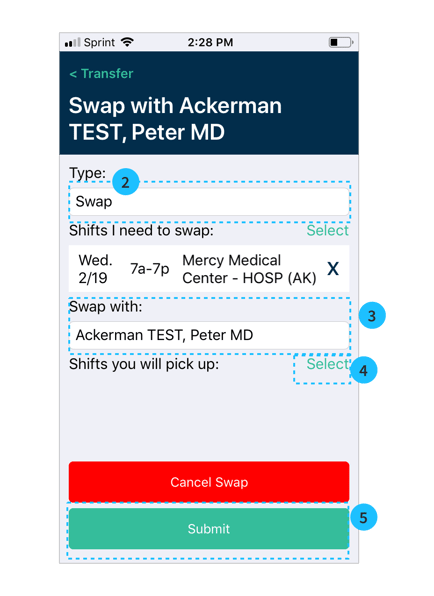
- From the home screen, select My Schedule
- Select the shifts you want to swap by tapping them. You can select multiple shifts.
- Initiate Transfer
- In the Type field, select Swap (2 above)
- tap the Swap with field to select the provider you want to swap shift(s) with. (3 above)
- Select shifts you can cover for that provider by pressing Select next to Shifts you will pick up. (4 above)
- Submit
Troubleshooting error messages
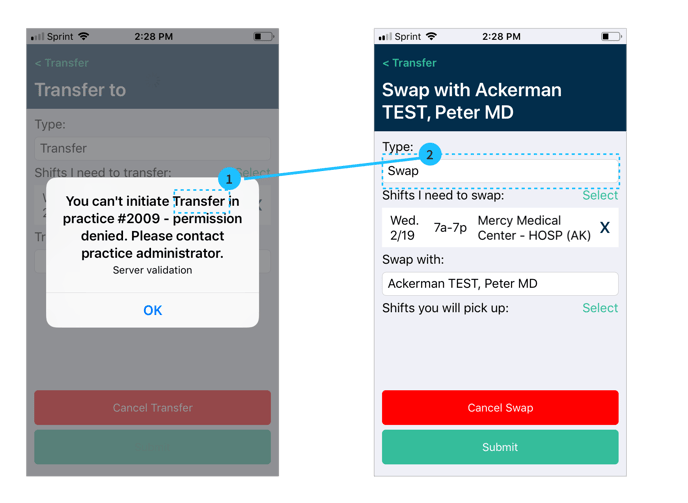
Your practice administrator can select whether you are allowed to transfer or swap.
If you see the error that you can't initiate a Transfer
1. Select "OK" and
2. change the "Type" to "Swap"
3. Select swaps you will pick up
4. Submit
If you see the error that you can't initiate a Swap
1. Select "OK" and
2. change the "Type" to "Transfer"
3. Confirm the provider you want to transfer to.
4. Submit
After requests are sent
Notification
You will receive a notification if a request is sent to you by another provider.
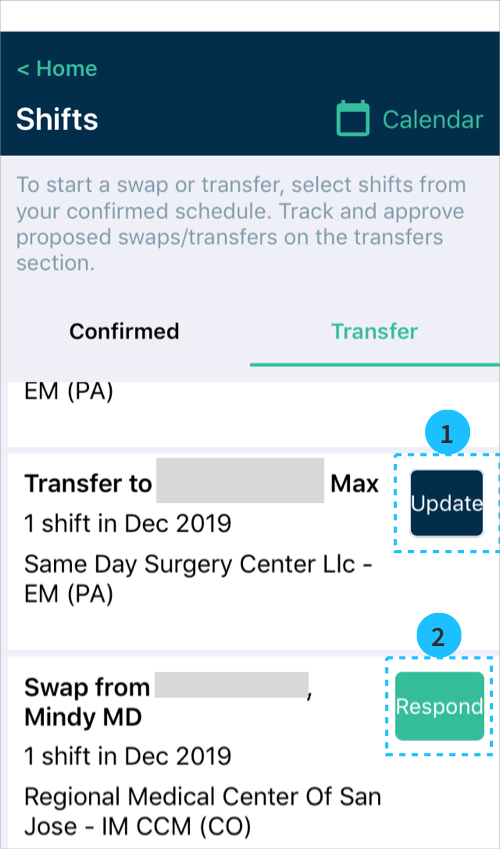
Viewing sent/received transfers
From the home screen, select Shift Transfers
- Requests sent by you say "Swap/transfer to..." and show the option to Update if you want to edit the request.
- Requests from other providers say "Swap/transfer from..." and show the option to Respond
What happens next?
You will receive a notification if your request is approved or declined by another provider or organization. If the request is approved the schedule is automatically updated for the change.