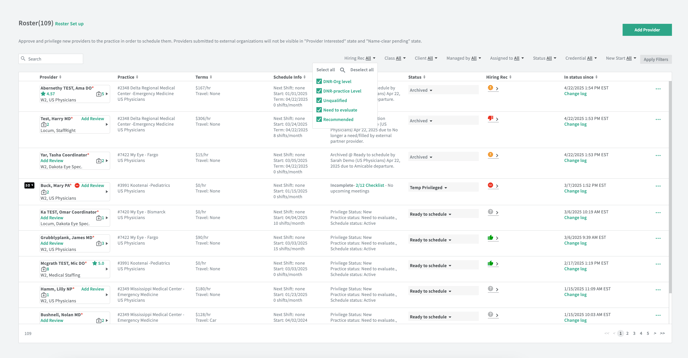
When archiving a Roster, users will be prompted to leave a hiring recommendation for that provider at that particular practice. All hiring recommendations will be set to 'need to evaluate' by default.
These hiring recommendations will be organization specific. Only users in your organization will be able to review the recommendations you set for your organization. (EX: Client sets a roster's hiring recommendation as 'unqualified'. Agencies will not see what the clients set on their side)
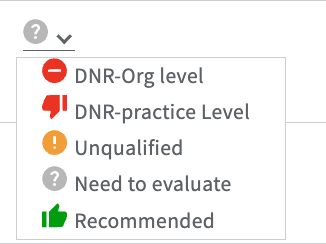
The different recommendation statuses are:
- DNR - Org level (set an organizational 'do not return' and block new provider submissions across my whole organization
- DNR - Practice level (set a practice 'do not return' and block provider from getting submitted to this practice again)
- Unqualified (do not block this provider from getting re-submitted to this practice again)
- Need to evaluate
- Highly Recommended (consider for future needs)
NOTE ON DNR-ORG LEVEL: Setting a hiring recommendation for a roster to DNR - Org level will automatically update ALL rosters for that provider in your organization to a DNR - Org level status. It will also change their provider profile organization evaluation status to DNR - Org level. This will prevent a provider from being submitted to ANY jobs within your organization.
NOTE ON DNR-PRACTICE LEVEL: Setting a hiring recommendation for a roster to DNR - Practice level will automatically set ALL rosters for that provider in that practice to a DNR - Practice level. This will prevent a provider from being submitted to any jobs at that practice again.
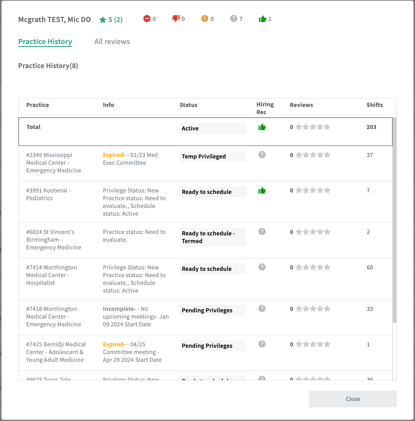
Hiring recommendations can be viewed from many places - roster workspace table, practice roster table, practice history modal, and in the practice/rates tab of the provider profile. Users can filter by hiring recommendations in the Roster Workspace and Practice Roster tables.