
View Confirmations in Kimedics for your providers on the Schedule.
Go to Schedule > Conformations tab > Search for your provider and click into their confirmation. You will see all of their upcoming shifts. If any shifts need attention, you will be able to see that here.
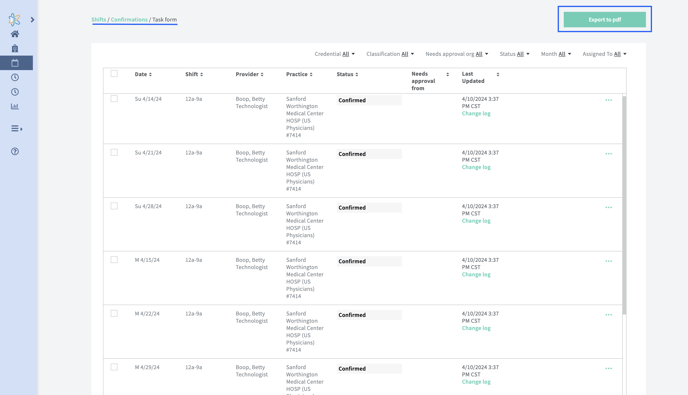 Click 'Export to PDF'
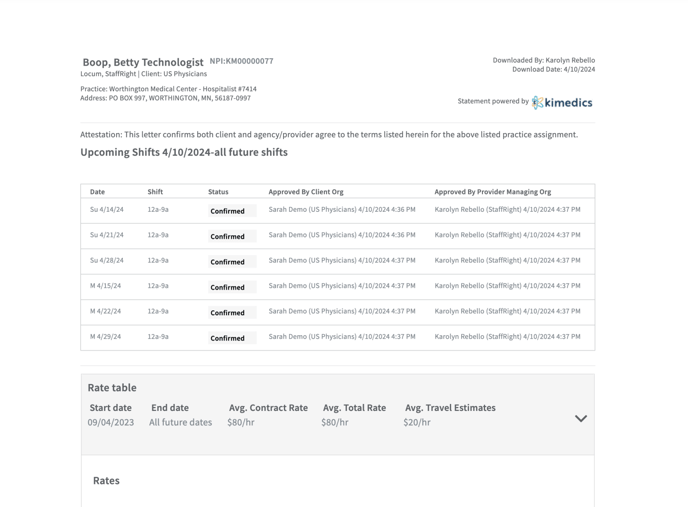
The confirmations will look like the image above.
See who the confirmation letter is for, the practice + address, dates of the shifts along with the statuses, who approved the shifts from both orgs, and who downloaded the confirmation + when.
Rates attached to the shifts will also appear at the bottom with the agreed rate table.
*note that confirmations will not show shifts in the past - only those in the future. Confirmations will ONLY pull over shifts that are in a confirmed status and rates that are associated to the shifts that have been assigned.