
No longer need a shift? Request to cancel!
This action can be done from multiple places (please note a shift must be in a confirmed status):
- Schedule
- Shifts Table
- Confirmations
- Scheduler Shift or Provider view
.png?width=688&height=166&name=Screenshot%20(4).png)
.png?width=688&height=383&name=Screenshot%20(3).png)
When a cancellation is initiated, a modal will appear requesting who is initiating the cancellation (provider/client/provider org), why the cancellation is being initiated, and any additional information. This modal will let the user know how many days before the shift the cancellation is being requested. All of this information will be stored in the change log for the shift.
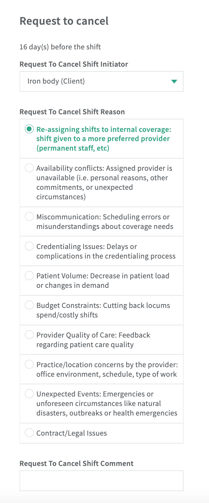
If confirmations are on, the approving party will then have to approve the request to cancel.
**If you do not want to approve, please reach out directly to the requesting party to undo the cancel request.
.png?width=688&height=112&name=Screenshot%20(5).png)
- Once the cancel request is set into motion, it will drop off the calendar/schedule.
- The shift will show up in the shift table for unconfirmed shifts and in Confirmations as a cancel request until it is approved.
- The shift will remain in the cancel request state until the other party approves it.
- The shift will no longer appear in Pending Submissions for Time Sheets.
If you no longer need the cancel request, you can click undo to move the shift back to the previous state it was in.
.png?width=688&height=111&name=Screenshot%20(6).png)