
The privileging checklist has tasks that must be completed on behalf of providers for privileging applications and meetings. Checklist items you add here will appear on forms for providers in status "Pending Privileges".
Open Setup/Privileging Checklist
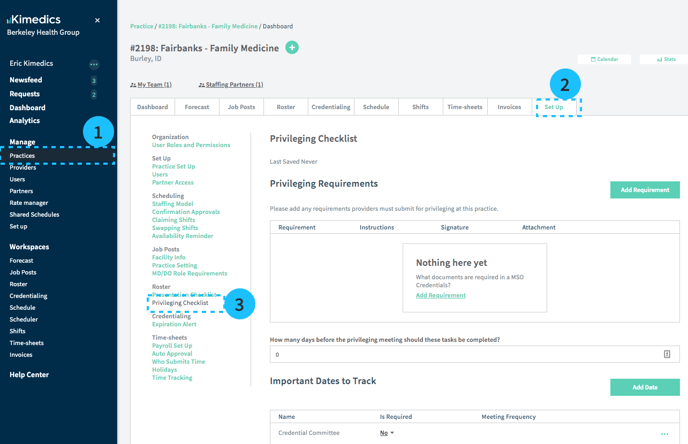
- Go to the Practices table and select your practice
- Set Up
- Privileging Checklist
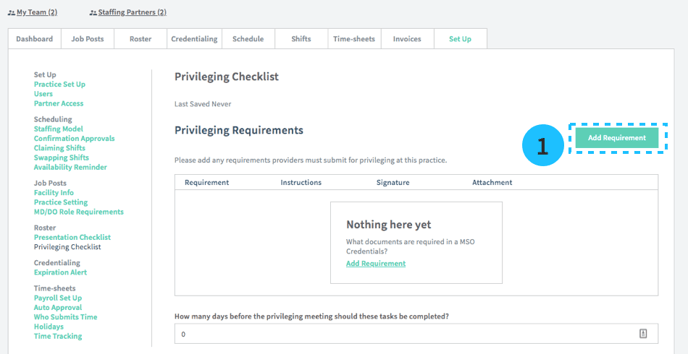
Add Requirements
Example of privileging requirements:
- Documents required for MSO
How to add requirements
- Tap Add Requirement button
- Enter requirement information and Save.
Add Important Dates
Here are a few examples of dates you might want to track for privileging:
- Credential Committee
- Quality Committee
How to add important dates
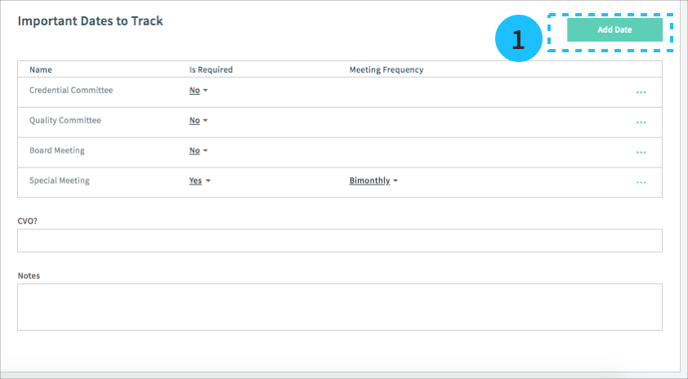
1. Select Add Date.
2. Provide the name of your date or meeting
3. You can edit whether it is required and if it is required, the frequency.