
What is a practice?
Practices are the hub of activity on Kimedics. The defining characteristics of a practice are its facility and specialty (e.g. Dermatology at Chickasaw National Medical Center). You can share access to practices with partners and users of your organization.
Add a practice
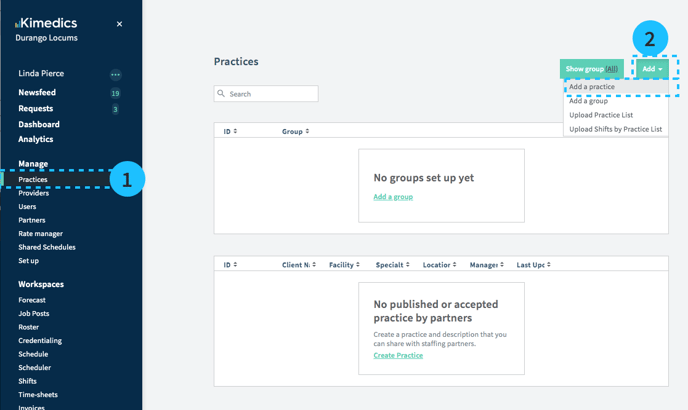
- Select Practices section on the left navigation
- Select Add>Add a practice
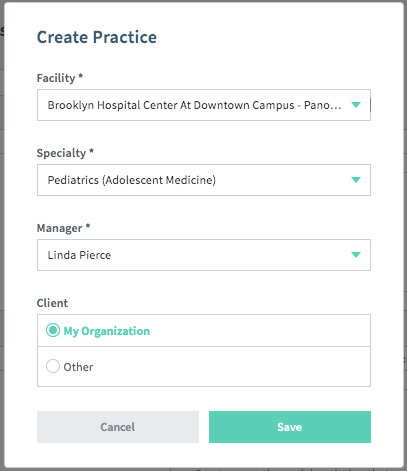
- Fill in information about the practice and Save
- Facility - Where is it?
- Specialty - What medical specialty do providers at this practice have?
- Who manages this practice? (This person gets administrative privileges)
- Client - If your organization should have administrative privileges on the practice, select "My organization"
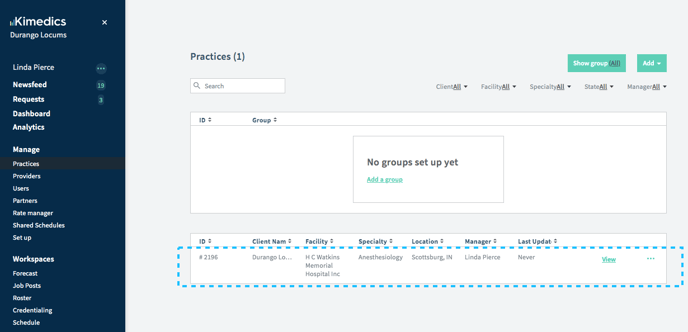
- Now the practice will appear in your "Practices" list
Practice groups
You can group practices together to view their workspaces (Forecasts, Job Posts, Roster, Credentialing, Scheduling, Confirmations, Time sheets, Invoices, Analytics) combined in one page.