What are partners?
Partners are other organizations on Kimedics connected with your organization.
Typical partners might be:
- a staffing agency that helps fill a medical group's schedule
- an MSP that collaborate's on a medical group's practices
- clients that work with a staffing agency
Adding a partner
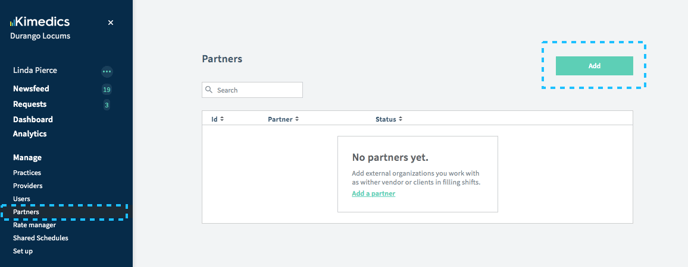
- Navigate to Partners section on the left
- Click Add
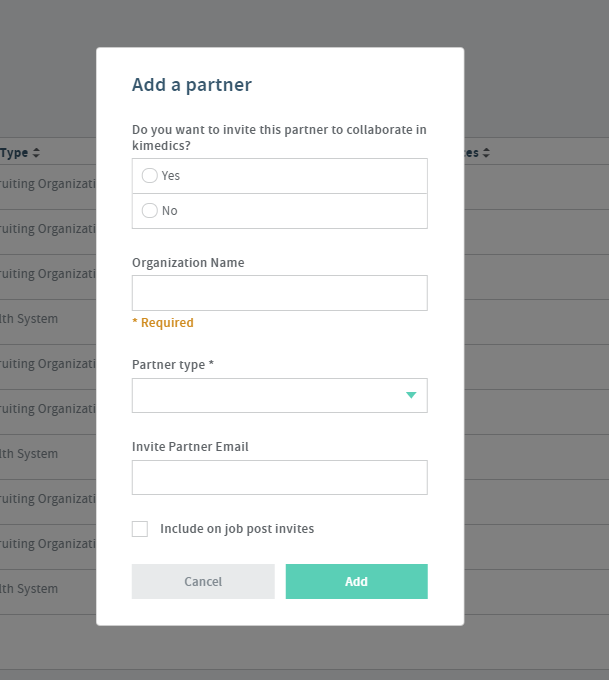
- Type the name of the partner's organization. If they are already registered in Kimedics, that's all you need to do. Send by pressing Add
- If the organization you are inviting is new to Kimedics, you'll need to enter the name and your contact's email address.
- The person you invite will receive an email asking them to connect with you.
Configuring Partners
"Disabled" - if you are not ready to collaborate with a partner you can answer "No" to "Do you want to invite this organization to collaborate in Kimedics". This will let you track data related to this partner but will not invite/allow collaboration until you change this to "yes".
"Partner Type" - Some partners might be clients, other vendors, and other collaborators like revenue cycle groups who need access to your rosters and other practice/provider details. The "Partner Type" field helps you keep track of what your relationship is with your different partners.
"Include on Job Posts" - When managing partners you can define which partners should be an option to invite to a job post or not. For example, if you have a partner who is a client, you would likely not be sending job posts to them, only your staffing agency vendor partners.
Checking status of invitation
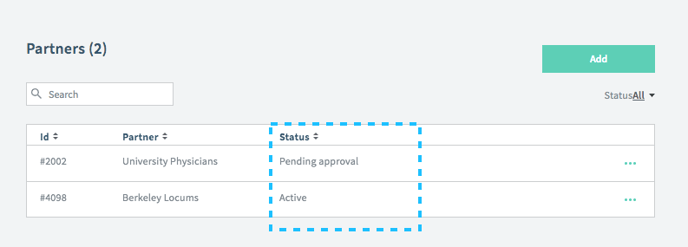
To see whether the partner has accepted your invitation, you can check in the Partners section on the Status column.
"Pending approval" means they haven't responded yet.
"Active" means you are connected.